
Interactive Gantt Charts with Frappe.js: The GX Frappe Gantt Chart Control

I built two Gantt chart user controls at Teamexus — GX Google Gantt Chart for teams that want the full Google Charts feature set, and GX Frappe Gantt Chart for when you want something lighter and directly editable in the browser. It wraps Frappe Gantt, and unlike the Google-backed control, everything needed ships inside the .xpz — no external library to load separately.
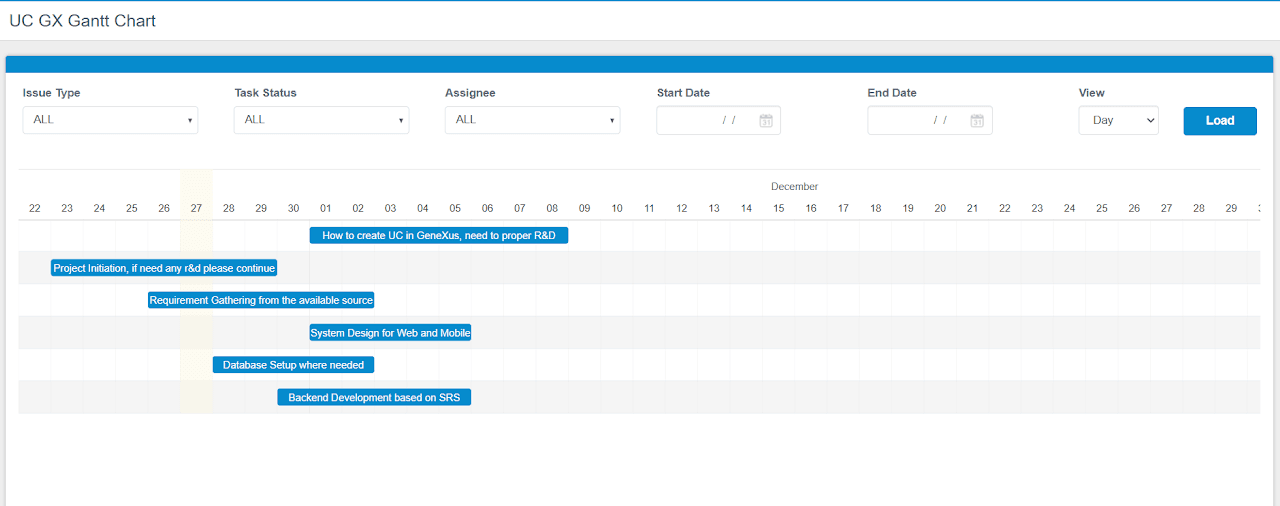
What it does
Tasks render as draggable bars on a timeline. Users can drag a bar to reschedule it, resize it to change duration, or update progress directly on the chart — and GeneXus finds out immediately, because every interaction fires an event with the updated task data attached.
Installing it
- Download
FrappeGanttChart_V1.0.xpzfrom the GitHub repo. - Knowledge Manager → Import, select your KB, Load → Import, then choose the
.xpz. - Drag
UCFrappeGanttChartonto a Web Panel from the Toolbox.
Configuration
| Property | Purpose | Default |
|---|---|---|
GanttChartItems | Task collection (SDT) | — |
BarProgressColor | Progress-bar fill color | #2a2c5f |
GanttBarFill | Task-bar background color | #078BCD |
HeaderHeight | Header height, px | 50 |
ColumnWidth | Column width per time unit, px | 30 |
BarHeight | Task-bar height, px | 20 |
Step | Time step for rendering | 24 |
BarCornerRadius | Corner radius of bars | 3 |
ArrowCurve | Curvature of dependency arrows | 5 |
Padding | Container padding | 18 |
ViewMode | Day / Week / Month | Day |
Each task in GanttChartItems is a TaskItem with seven fields: id, name, resource, start, end, progress, and dependencies (a comma-separated list of other task IDs) — a straightforward map from most existing task tables.
Reading changes back
Three events cover the interaction surface: OnClickTask, OnDateChange, and OnProgressChange. All three populate the same runtime property, ReturnGanttChartItem, with a JSON string describing the affected task — read it into a TaskItem with .FromJson() inside the event handler and you have the updated task as a normal GeneXus object, ready to write back to your data.
That's the whole update loop: user drags a bar → OnDateChange fires → &ReturnTask.FromJson(&ReturnTaskStr) gives you the new dates → save the record → optionally refresh GanttChartItems if something else on the page depends on the change.
Wiring it up
A trimmed version of the reference implementation — seeding a five-task dependency chain, then handling all three events:
&GanttChartItems is GanttChartItems
&GanttChartItem is GanttChartItems.TaskItem
&ReturnTask is GanttChartItems.TaskItem

Event Refresh
    &GanttChartItems.Clear()

    &GanttChartItem = new()
    &GanttChartItem.id = !'Task 1'
    &GanttChartItem.name = !'Define Requirements'
    &GanttChartItem.resource = !'Riadul'
    &GanttChartItem.start = &Today
    &GanttChartItem.end = &Today.AddDays(3)
    &GanttChartItem.progress = 10
    &GanttChartItem.dependencies = !''
    &GanttChartItems.Add(&GanttChartItem)

    &GanttChartItem = new()
    &GanttChartItem.id = !'Task 2'
    &GanttChartItem.name = !'Design Phase'
    &GanttChartItem.resource = !'Riadul'
    &GanttChartItem.start = &Today.AddDays(4)
    &GanttChartItem.end = &Today.AddDays(7)
    &GanttChartItem.progress = 20
    &GanttChartItem.dependencies = !'Task 1'
    &GanttChartItems.Add(&GanttChartItem)

    &GanttChartItem = new()
    &GanttChartItem.id = !'Task 3'
    &GanttChartItem.name = !'Development Phase'
    &GanttChartItem.resource = !'Riadul'
    &GanttChartItem.start = &Today.AddDays(8)
    &GanttChartItem.end = &Today.AddDays(14)
    &GanttChartItem.progress = 50
    &GanttChartItem.dependencies = !'Task 2'
    &GanttChartItems.Add(&GanttChartItem)

    // Task 4 (Testing & QA) and Task 5 (Deployment) follow the same
    // pattern, each depending on the one before it.
EndEvent

Event UCFrappeGanttChart1.OnClickTask
    &ReturnTaskStr = UCFrappeGanttChart1.ReturnGanttChartItem
    &ReturnTask.FromJson(&ReturnTaskStr)
    msg('OnClickTask -> ' + &ReturnTask.ToJson().ToString())
EndEvent

Event UCFrappeGanttChart1.OnDateChange
    &ReturnTaskStr = UCFrappeGanttChart1.ReturnGanttChartItem
    &ReturnTask.FromJson(&ReturnTaskStr)
    msg('OnDateChange -> ' + &ReturnTask.ToJson().ToString())
EndEvent

Event UCFrappeGanttChart1.OnProgressChange
    &ReturnTaskStr = UCFrappeGanttChart1.ReturnGanttChartItem
    &ReturnTask.FromJson(&ReturnTaskStr)
    msg('OnProgressChange -> ' + &ReturnTask.ToJson().ToString())
EndEvent
All three handlers follow the same two-line shape — read ReturnGanttChartItem into a string, then .FromJson() it into a TaskItem — so in practice you'd factor that pair into a shared subroutine rather than repeating it three times.
FAQ
Do I need to install any external libraries?
No — everything is bundled in the .xpz via Frappe.js.
Can I customize the colors and layout? Yes — progress-bar color, bar fill, padding, column width, and more are all design-time properties.
Can I read data back out of the chart dynamically?
Yes, via ReturnGanttChartItem inside OnClickTask, OnDateChange, or OnProgressChange.
Getting it
GX Frappe Gantt Chart is on the GeneXus Marketplace and the source is on GitHub. Support: support@teamexus.com.